The other week, I noticed a persistent smudge on my Alienware AW3423DWF. It wasn’t a dead pixel or burn-in, just some dust, a few faint fingerprints, and what looked like a tiny, dried droplet that had been there for a while. It became painfully obvious during a dark scene in a game, reflecting the ambient light just enough to be distracting. My usual quick wipe with the edge of my shirt, which I’ll sheepishly admit to doing on occasion with an old TN panel, wasn’t going to cut it here. I knew better than to risk this panel.
I’ve cleaned countless monitors, TVs, and touchscreens over the years. For most LCDs, a spray of screen cleaner and a quick wipe with a microfiber cloth usually does the trick. But QD-OLED is a different beast altogether. These panels have a very specific, delicate anti-reflective coating that isn’t just a simple matte finish. It’s close to the surface, and it’s easily damaged by harsh chemicals, abrasive materials, or even just too much pressure. My approach here isn’t about fancy gadgets or expensive solutions; it’s about minimizing risk and using the safest, most effective method I’ve found to reliably get a pristine screen.
How to Safely Clean Your QD-OLED Monitor
Gather Your Tools
- High-quality microfiber cloths: And I mean *high-quality*. Not the cheap, fuzzy ones you get in a multi-pack from the discount store. I use the kind I keep for my camera lenses or prescription glasses – ultra-soft, lint-free, and designed for delicate optics. You’ll need at least two, preferably three.
- Distilled water: This is crucial. Tap water contains minerals that will absolutely leave streaks on your screen. Don’t skip this.
The Cleaning Process
- Power down and cool off: First, turn off your monitor and unplug it from the wall. You want the panel to be completely cool to the touch. This makes it easier to see smudges against a black, unlit surface, and ensures you’re not working on a slightly expanded, more vulnerable surface.
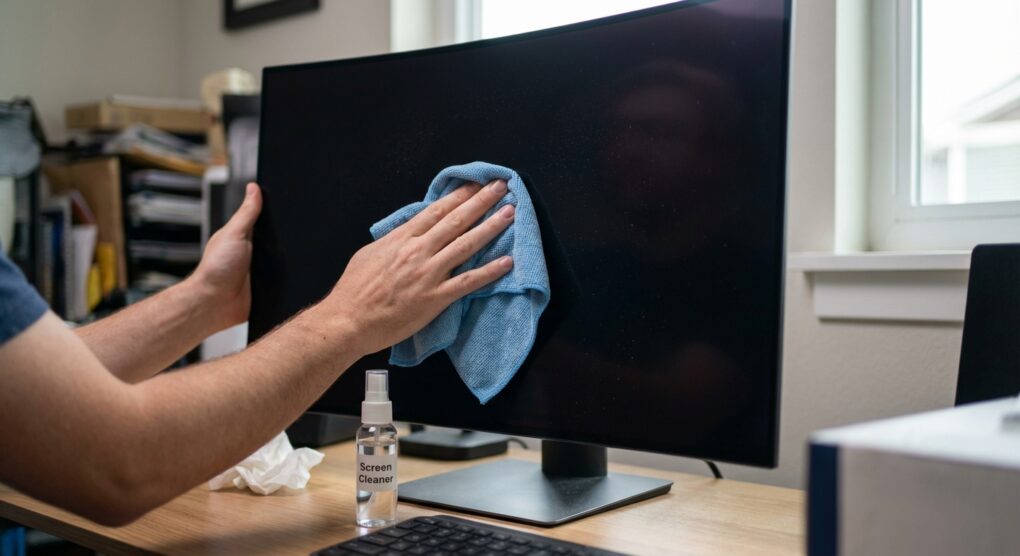
- Initial dry dust removal: Take one of your *clean, dry* microfiber cloths. Gently, with almost no pressure, wipe the screen in broad, sweeping motions from top to bottom or side to side. The goal here is to remove any loose dust or particles that could scratch the screen if rubbed in later. Don’t press hard; let the cloth do the work.
- Dampen, don’t spray: Take your second clean microfiber cloth. Lightly dampen a corner or section of it with distilled water. The cloth should be *damp*, not wet. You shouldn’t be able to wring any water out, and there should be no drips. Never spray water or any liquid directly onto the screen. This is a recipe for disaster, as liquid can seep into the bezels and cause internal damage.
- Gentle wipe for smudges: With the damp part of the cloth, gently wipe the screen. Again, use very light pressure. Start at one edge and work your way across in overlapping, consistent strokes. For any stubborn spots, don’t increase pressure. Instead, gently breathe on the spot (the warmth and moisture from your breath can help loosen it), then re-wipe with the damp cloth. Think of it as coaxing the grime off, not scrubbing it.
- Immediate dry buff: Immediately after wiping a section with the damp cloth, take your *third, completely dry and clean* microfiber cloth. Gently buff the damp area dry, again with light pressure. This prevents any water spots or streaks from forming as the distilled water evaporates. Speed is key here to avoid streaking.
- Inspect thoroughly: Once you’ve gone over the entire screen, use a flashlight or shine a room light from different angles onto the turned-off screen. This will reveal any missed spots or lingering streaks. If you see any, repeat steps 3-5 until the screen is perfectly clean.
- Power on: Once you’re absolutely sure the screen is dry and clean, plug it back in and power it on. Enjoy your pristine display.
Common mistakes
I’ve seen these pop up too many times, and frankly, I almost fell victim to one myself when I first got my QD-OLED. The biggest trap is thinking all screen cleaning is the same.
- Using the wrong cleaning agents: This is the absolute biggest no-no. Windex, ammonia-based cleaners, kitchen sprays, window cleaner, or even generic multi-surface wipes are guaranteed to damage the delicate anti-reflective coating on a QD-OLED over time, if not immediately. They can strip the coating, leaving permanent hazy patches or dull spots. Stick to distilled water. If you absolutely *must* use a chemical for something truly stuck on, it needs to be an official monitor cleaner explicitly stated as safe for OLEDs and used with extreme caution, but honestly, distilled water almost always does the trick if you’re patient.
- Spraying liquid directly onto the screen: As I mentioned, this is just asking for trouble. Liquid can run down into the bezel gaps and cause shorts or leave permanent residue inside the panel. Always dampen the cloth, never the screen.
- Using paper towels or rough cloths: Paper products, even soft tissues, are abrasive. They contain wood fibers that are much harder than the anti-reflective coating on your screen and will cause micro-scratches that become visible over time, especially when light hits the screen a certain way. Same goes for those cheap, rough microfiber cloths that shed lint.
- Applying too much pressure: You’re not scrubbing a pot. These panels are delicate. Excessive pressure can damage the pixels or the coating. If a spot isn’t coming off, don’t press harder; instead, re-dampen the cloth, breathe on the spot gently, and try a few more light passes.
- Using tap water: I mentioned this in the tools, but it bears repeating. The minerals and impurities in tap water will leave frustrating streaks and residue, making all your hard work pointless. Always use distilled water.
- My own mistake: The first time I properly cleaned my new QD-OLED, I grabbed the bottle of “electronics screen cleaner” I’d used on my old matte LCD for years. It was a respected brand, supposedly safe for all screens. I sprayed it onto the microfiber and wiped. While it seemed okay at first, under direct light, I could see a faint, almost iridescent, oily smear that refused to budge with more of the same cleaner. It wasn’t until I switched to pure distilled water and a fresh, clean cloth that I finally managed to get rid of it. It was a close call, and it taught me that even “safe” universal cleaners might not be QD-OLED safe.
When it comes to QD-OLEDs, patience, specific tools, and a gentle touch are your best allies for a pristine display.